Unreal Engine
VFX Agent
Aura can create and edit Niagara particle systems from natural language descriptions. Give it a prompt and it'll generate a complete multi-emitter system — including materials, textures — saved directly into your project. This provides a starting point for further manual iteration and styling.
ℹ️ Make sure you're in Agent mode to use the VFX Agent.
⚠️ The VFX Agent is in alpha. Save and back up your project regularly. Token costs are not optimized. Support for Unreal Editor earlier than 5.6 is currently limited.
Creating a Particle System
Switch to Agent mode and describe the effect you want. Aura will build the Niagara system and save it to your Content Browser.
Examples
- "Create a fiery explosion effect."
- "Make a looping rain effect with water droplets."
- "Create an ambient floating dust mote effect."
- "Create a campfire effect with rising embers and smoke."
💡 VFX generation can take longer than other tasks — Aura plans the system, builds materials and textures, validates the structure, then assembles the emitters. You can work in a separate chat thread while it runs.
Editing an Existing System
You don't have to rebuild an effect to change it. Point Aura at a Niagara system and describe what you want different — it snapshots the system first, makes the narrowest change that does the job, then compares before and after to confirm nothing else moved.
Many changes now happen in place, without rebuilding the emitter:
-
Looping and lifecycle — whether an emitter loops once, forever, or a set number of times, plus loop duration, delay, and what happens when it goes inactive.
-
Simulation settings — switching an emitter between CPU and GPU simulation, enabling or disabling it, or making it simulate in local space so the effect follows the actor it's attached to.
-
System-level settings — the system's own loop behavior, warmup time (so an ambient effect is already mid-flight when it appears), and fixed bounds.
-
Materials and meshes — swapping the material or mesh on a renderer, with no rebuild at all.
Structural changes — adding, removing, or reordering modules, or changing module parameters like spawn rate, size, or lifetime — rebuild the single emitter involved and leave the rest of the system alone.
Examples
-
"Make this explosion a one-shot instead of looping."
-
"Switch the smoke emitter to GPU simulation."
-
"Swap the material on the sparks to the new orange one."
-
"Double the spawn rate on the fire core."
-
"Add some warmup so the dust motes are already drifting when the level loads."
-
"Remove the glow emitter from this system."
💡 Changing particle color means editing the emitter's Color module, not swapping the material — so ask for the color you want and Aura will rebuild that emitter rather than looking for a different material.
Removing orphaned modules, inputs, or parameters is treated as a cleanup pass: Aura shows you what it found and waits for your go-ahead before deleting anything.
Materials and Transparency
Aura creates the particle materials and textures alongside the system. Textures are generated with real alpha rather than a painted-on background, and Aura picks a blend mode to match the renderer:
-
Additive for fire, sparks, and glows.
-
Translucent for smoke, dust, and fog.
-
Masked for hard-edged shapes like leaves or confetti.
-
Opaque stays valid for solid 3D debris on a Mesh renderer — rock chunks and rubble are meant to be opaque.
After building a material, Aura checks it: that the blend mode suits the renderer, and that a translucent material actually has its texture feeding both emissive and opacity. If something's missing it reconnects it and re-checks before moving on. A blend mode can also be corrected in place later without rebuilding the material graph, so you can just ask.
Examples
-
"Make the smoke material translucent instead of additive."
-
"The embers look like flat white squares — can you fix the material?"
Custom HLSL Modules
As of v0.13.7, the VFX Agent can generate fully-wired Niagara Custom HLSL modules, allowing it to build effects that go beyond the standard module library.
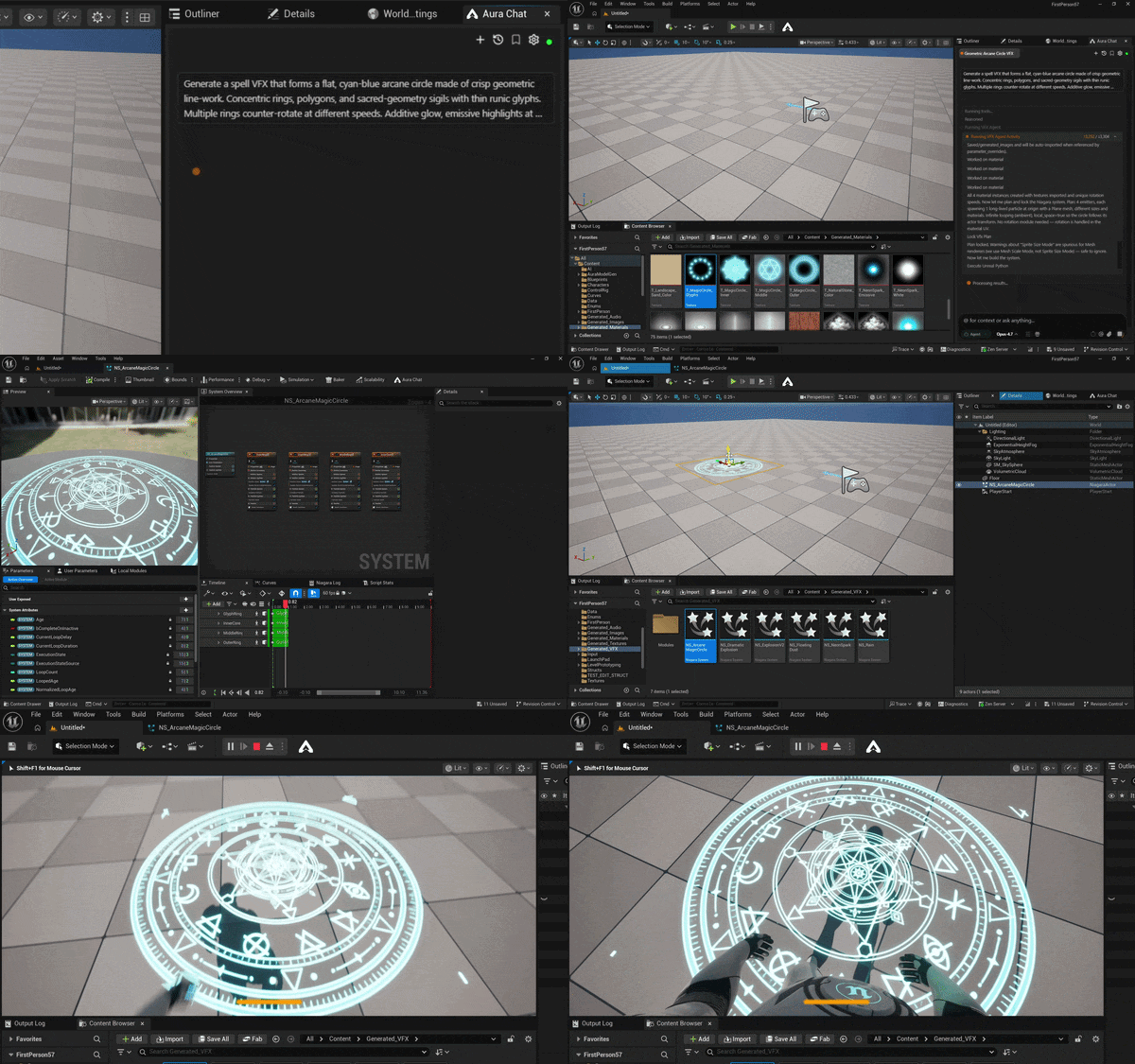
Example prompt:
- "Generate a spell VFX that forms a flat, cyan-blue arcane circle made of crisp geometric line-work — concentric rings, polygons, and sacred-geometry sigils with thin runic glyphs. Multiple rings counter-rotate at different speeds. Additive glow, emissive highlights at intersections, semi-transparent holographic feel, symmetrical and precise. No smoke or organic shapes, purely geometric, anime magic circle style."
Workflow Tips
- Name the effect type clearly. "A soft ambient glow" is harder for Aura to parse than "a looping ambient particle effect with slow-moving, faintly glowing orbs." Describe the visual clearly and Aura will choose the right recipe and modules.
- Describe the context. Mentioning where the effect will be used — "an explosion for a grenade," "an ambient loop for an underwater cave" — helps Aura make better decisions about scale, density, and timing.
- Review in-editor before iterating. Open the Niagara editor to preview the result before asking for changes. Seeing what Aura built helps you give more specific feedback.
Current Limitations
We're actively working on improving the VFX Agent. It'll only get better from here!
Undo behavior
The VFX build process bypasses the standard undo stack to call Niagara APIs directly. If you undo after creating a system, the asset may not be fully removed. If this happens, delete the asset manually from the Content Browser.
Complex custom requests
Aura works best with clear effect archetypes. Highly custom or stylized requests ("a painterly watercolor splash") may produce unexpected results.
Limited Unreal Engine Version Support
Currently, functionality is limited in UE versions 5.5 and earlier. The emitter stack will get created but some parameters and modules will be left to their default values.